 COURSE PREVIEW
About this course
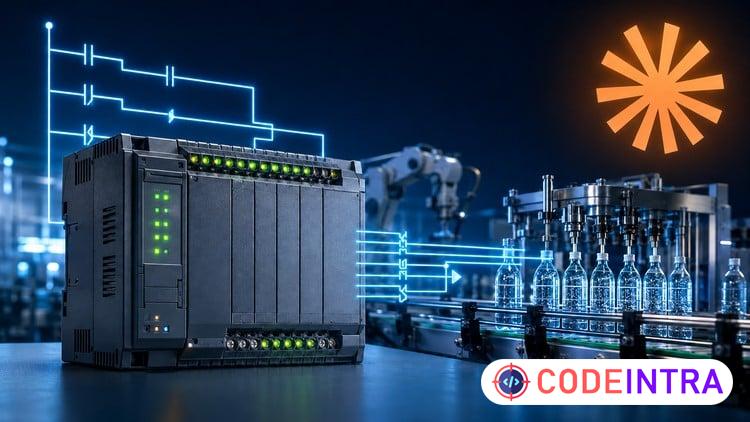
Learn PLC programming and ladder logic from scratch in approximately three hours—without buying expensive PLC hardware or industrial software.
This beginner-friendly course takes you from understanding what a Programmable Logic Controller is to planning, building, simulating, and testing a complete automatic bottle-filling system.
You will begin with the foundations of industrial automation: PLC inputs and outputs, the scan cycle, ladder diagrams, rungs, contacts, coils, bits, tags, and addresses. You will then build your first working ladder logic program using a free PLC simulator.
Step by step, you will learn how to:
Read and write PLC ladder logic
Use Normally Open and Normally Closed contacts
Build AND, OR, XOR, and NOT logic
Create motor Start/Stop and seal-in circuits
Use standard coils and Set/Reset instructions
Detect rising and falling edges with one-shots
Avoid duplicate output and double-coil problems
Control processes with TON, TOF, and retentive timers
Count products using CTU, CTD, and CTUD counters
Use comparisons, range checks, math, and MOVE instructions
Organize sequences with finite state machines
Create clear PLC I/O lists and state diagrams
Use Claude AI to draft, explain, and debug PLC logic responsibly
You will reinforce these skills through practical exercises, including a motor Start/Stop circuit, blinking oscillator, conveyor product counter, tank-level alarm, and traffic-light state machine.
For the final project, you will build an automatic bottle-filling station. The PLC program detects a bottle, fills it, allows the liquid to settle, applies a cap, ejects the finished bottle, and counts production until a complete batch is reached.
The course uses free tools such as PLC Fiddle and OpenPLC, allowing you to practice PLC programming on a normal computer without physical hardware. The concepts you learn are transferable to major industrial platforms such as Siemens TIA Portal and Rockwell Studio 5000, although their software and instruction names may differ.
You will also discover how an AI assistant can help create I/O lists, draft ladder logic, explain instructions, and diagnose programming problems. More importantly, you will learn the professional rule behind AI-assisted automation: understand every rung, simulate every program, test edge cases, and never treat AI-generated logic as a substitute for safety engineering.
Who this course is for
This course is designed for:
Complete beginners interested in PLC programming
Electrical and electronic engineering students
Automation and control engineering students
Maintenance technicians entering industrial automation
Electricians who want to understand ladder logic
Makers and programmers exploring PLC control systems
Anyone who wants a fast, practical introduction to PLCs
No previous PLC programming experience is required. No physical PLC is required. You only need a computer, internet access, and a willingness to practice.
By the end of the course, you will understand the fundamental thinking behind ladder logic and be able to build, organize, simulate, test, and explain beginner PLC automation projects
What you'll learn
- Explain how PLCs, inputs, outputs and the PLC scan cycle work in industrial automation.
- Read, create and simulate PLC ladder logic using contacts, coils, rungs, tags and free PLC tools.
- Translate machine requirements into AND, OR, XOR and NOT logic using NO and NC contacts.
- Build motor Start/Stop circuits using seal-in latches, Set/Reset instructions and one-shots.
- Configure TON, TOF and RTO timers and CTU, CTD and CTUD counters for automation tasks.
- Use comparison, range-check, math and MOVE instructions to process numerical PLC data.
- Design traffic lights and machine sequences using finite state machines and state transitions.
- Build and test an automatic bottle-filling station using timers, counters, states and outputs.
- Use Claude AI to draft I/O lists, explain ladder logic and assist with PLC debugging responsibly.
- Test PLC programs, identify common ladder logic errors and verify safe operation in simulation.
Before you begin
- No previous PLC programming, ladder logic or industrial automation experience is required.
- A computer with internet access and a modern web browser is required for the free PLC simulator
- No physical PLC, electrical equipment or paid industrial software is required.
- Basic computer skills and a willingness to complete the hands-on exercises are recommended.
Who this is for
- Complete beginners who want a fast, practical introduction to PLC programming and ladder logic.
- Electrical, electronic, mechatronics, control and automation engineering students.
- Electricians and maintenance technicians who want to understand PLC-controlled machines.
- Junior automation engineers preparing to study Siemens, Rockwell or other industrial PLC platforms.
- Programmers and makers interested in industrial automation, machine sequencing and PLC simulation.
- Learners who want to use AI responsibly to plan, explain and debug beginner PLC projects.
How do you feel about this course?
Share your reaction. Select one emoji to leave or update your rating.
Please wait 30 seconds to explore this course.
This course opens on an external website.
Join the conversation
Share a thought or question. No account required.
Be the first to share your thoughts.


![[NEW] Professional Cloud Architect - Exam Preparation 2026 preview](/images/courses/professional-cloud-architect-exam-preparation-1792332710-f036ef.jpg)