 COURSE PREVIEW
About this course
သင်တန်းတွင် ပါဝင်သောအသေးစိတ် အကြောင်းအရာများ (Course Outline)
ဆော့ဖ်ဝဲလ် ထည့်သွင်းနည်း
အသုံးပြုသူ အင်တာဖေ့စ်
ပရောဂျက်တည်ဆောက်မှု တွင် မရှိမဖြစ် ပြင်ဆင်သည့် အသေးစိတ် ကိရိယာများ အသုံးပြုပုံ
Archi Modeling အဆောက်အဦးတခု အခြေခံ ပြုလုပ်နည်း
အဆောက်အဦး 3D MEP မော်ဒယ်များအတွက်
အဆောက်အဦး တွင် ACMV စနစ်များ ဆက်သွယ်မှု ဒီဇိုင်း
အဆောက်အဦး တွင်ရေပိုက်စနစ်များ ဆက်သွယ်မှု ဒီဇိုင်း
အဆောက်အဦး တွင်မီးကာကွယ်ရေးဆက်သွယ်မှု ဒီဇိုင်း
အဆောက်အဦး တွင်လျှပ်စစ်ဆက်သွယ်မှုဒီဇိုင်း
အဆောက်အဦး တွင် ပါဝင်သောပစ္စည်းစာရင်း များ အသေးစိတ်ပြင်ဆင်ခြင်း
လှုပ်ရှားမှု Video များ ပုံထုတ် ခြင်း
အသေးစိတ် စကေးအလိုက်ပုံထုတ်ခြင်း စသည်များ အခြေခံမှစ၍ပါဝင်ပါတယ်။
Course Detail Facts
Revit ဆော့ဖ်ဝဲလ် ထည့်သွင်းနည်း။
ဖိုင်အမျိုးအစား၊ Template ဖန်တီးနည်းနှင့် ရွေးချယ်နည်း။
User Interface နှင့် Toolbars ကိုအသုံးပြုနည်း။
Modify Tools နှင့် Essential Tools ကိုအသုံးပြုနည်း။
ACMV၊ ရေပိုက်၊ Plumbing ရေဆိုး ပိုက်များ ဆက်သွယ်ခြင်း ၊ Fire Protection မီးဘေးကာကွယ်ရေး ပိုက်များ၊ လျှပ်စစ် Lighting Plan and Power Plan များ ဖန်တီးနည်း ။
Template ဖန်တီးနည်း ။
Basic Architecture Modelling ကို အခြေခံမှ ဒီဇိုင်းဆွဲနည်း။
ပရောဂျက်များကို ချိတ်ဆက်နည်း။
ACMV၊ Plumbing ရေပိုက်၊ ရေဆိုး ပိုက်များ ဆက်သွယ်ခြင်း Fire Sprinkler, Fire Hydrant ,Hosreel မီးဘေး စနစ်ပိုက်များ ၊ လျှပ်စစ် Lighting Plan and Power Plan များ အသေးစိတ်အတွက် မော်ဒယ်ဒီဇိုင်းကို ဘယ်လိုအသေးစိတ်ပြုလုပ်နည်း။
MEP စည်းကမ်းတစ်ခုစီအတွက် MEP ပရောဂျက်များကို အချိန်တိုအတွင်း ဒီဇိုင်းဆွဲနည်း။
နမူနာပရောဂျက်များနှင့် အချိန်တိုအတွင်း ပါဝင်စာရင်းများ ပြုလုပ်နည်း။
Schedule Table စာရင်း များ ထုတ်နည်း နှင့် Print and Exporting ပြုလုပ်နည်း။
Walkthrough and Solar Animation ပြုလုပ်နည်း။
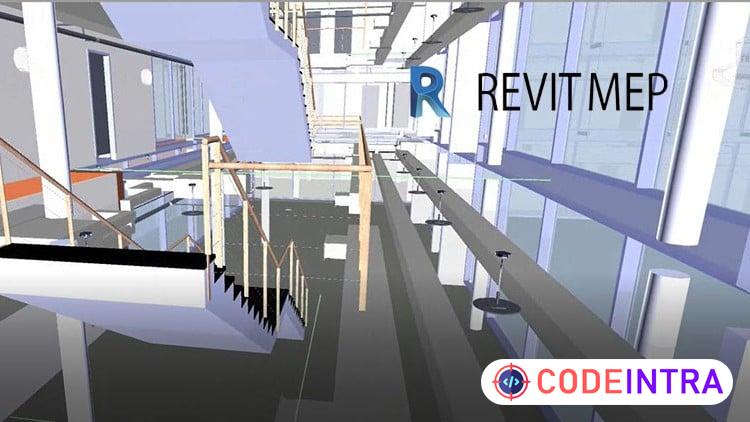
Revit MEP Modelling
M&E ပိုင်း စိတ်ပါဝင်စားသူများ
M&E Drafter/ Modelling ရေးဆွဲလိုသူများ
ကျောင်းသားကျောင်းသူများ Freelance လုပ်ကိုင်လိုသူ များ
ဆောက်လုပ်ရေး လုပ်ငန်း တွင် MEP ပိုင်းလေ့လာလိုသူများ
MEP Contractor များ
MEP Design ရေးဆွဲလိုသူများ တက်ရောက်သင့်သည့်သင်တန်းဖြစ်ပါသည် ။
သင်ကြားသော Trainer သည် Engineer ဘွဲ့ ရရှိထားသော သင်ကြားရေးအတွေ့အကြုံ များလည်း ရှိသော Freelance အလုပ်များ လည်း လက်ရှိလုပ်ကိုင်နေသော ဆရာမ ဖြစ်သည်။ online learning Platform တွင် 4.5 Star Rating and Good Reviews များရရှိထားသော နိုင်ငံတကာ ကျောင်းသားပေါင်း ၃၀၀၀ ကျော် လက်ရှိသင်ကြားပေးနေသော ဆရာမဖြစ်သည်။ Local တွင်လည်း ကျောင်းသားပေါင်း ၁၀၀၀ကျော် သင်ကြားပြီး ကျောင်းသားများလည်း နိုင်ငံတကာတွင် အောင်မြင်စွာ အလုပ်လုပ်ကိုင် လျက်ရှိကြသည် ။
What you'll learn
- How to Install Revit Software Full version.
- How to Use File Type,Template and Creating.
- How to use User Interface and Toolbars.
- How to use the Modify Tools and Essential Tools.
- How to choose Template for ACMV, Plumbing, Fire Protection, Sanitary, Electrical.
- How to Design the Basic Architecture Modelling.
- How to Connect Linking the Projects.
- How to Details Modelling Design for ACMV,Plumbing,Electrical,Fire Protection,Sanitary Details.
- How to Design the MEP Projects for each Discipline within short time.
- How to Clash detection with Sample Project within short time.
- How to Reporting with Schedule and Export Print.
- How to Animation with Solar, Walkthrough.
Before you begin
- Need Computer Basic Experience
- Need PC or Laptop compatible with Revit 2021 Specification
- You need to willingness to learn to Create MEP Modelling and Reporting, Animation.
Who this is for
- People who have no experience for Revit and want to learn it.
- People who want to learn Beginner Level to Pro Level.
- Beginner to Pro Revit MEP Course.
- People who want to learn how to make 3d Model for MEP Design.
- People who want to learn how to Modelling Complex Projects for MEP with Revit in less minutes.
- People who want to learn how to Reporting Complex Projects for MEP within short time.
- People who want to learn how to creating MEP Families with easy method.
- People who want to learn how to Export the Material Takeoffs and animation video from 3d model.
How do you feel about this course?
Share your reaction. Select one emoji to leave or update your rating.
Please wait 30 seconds to explore this course.
This course opens on an external website.
Join the conversation
Share a thought or question. No account required.
Be the first to share your thoughts.